
Complementary Shaders - Unbound
Transforming the visuals of Minecraft with exceptional quality, detail, and performance.
About

About
Complementary Shaders is a shader pack for Minecraft Java Edition with exceptional attention to detail, high standards of quality, and top tier optimisation. It offers a ton of high quality effects, two default visual style choices, custom effects for almost every block in the game, profiles ranging from Potato to Ultra and it's designed to never be obstructive during gameplay. It started as an edit of BSL Shaders in 2018, and it received countless major updates including a complete rewrite to meet the standards of our community. Complementary Shaders is dedicated to be shaped by user feedback over anything else, and it still receives regular updates to this day.
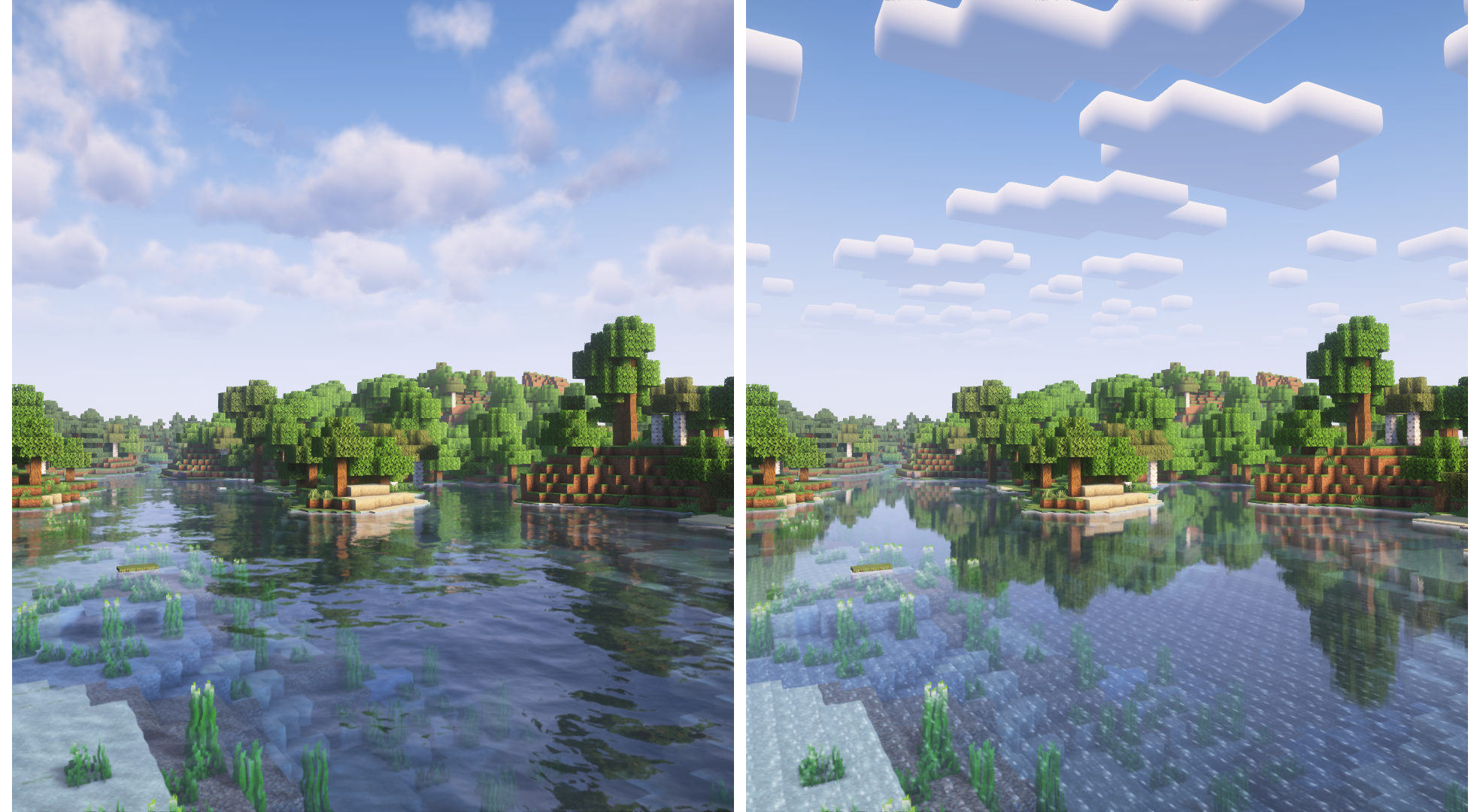
"Unbound" is one of the two default styles Complementary Shaders r5 comes with. It is the less restricted style of Complementary that aims for a more realistic image. Learn more about the two styles here.
<br>Choose Your Style
Complementary Shaders comes with two distinct visual style options. The only difference between these two styles is the default settings. The Unbound style is designed for people looking for a more realistic experience, while the Reimagined style is made to reimagine Minecraft while preserving its unique visual elements. Please note that you can still customize everything after you download either style. You can switch to blocky clouds on the Unbound style, or use realistic water on the Reimagined style. All settings are located in Shader Options.
-------------------- Unbound Style ---------------------------------------- Reimagined Style --------------------
Installation
New: You can just download the Complementary Installer and click Install to automatically do all the steps below. <br> - First you need to install the Iris mod to be able to load shaderpacks. <br> - Then you need to launch the game, and get to the Shaderpacks/Shaders menu in Video Settings. <br> - Open the shaderpacks folder by clicking the button in the menu. <br> - Download Complementary Shaders and put it in the shaderpacks folder. (Please don't unzip the file) <br> - Get back in the game, and choose Complementary in the shaderpacks menu. (Refresh the menu if it doesn't appear)
<br>Other
- Check out the Complementary Development Website for more information. <br> - Join the Complementary Discord community if you have any questions, or just want to talk. <br> - If you would like to support the development of Complementary, you can do so on Patreon.
Versions
The r5.7 update brings improved light shafts, improved colored lighting, tons of fixes to world-space reflections, new player reflections, mirror-like tinted glass option, pixelated Reimagined rainbows, support for chunk fade-in effect, improved water coloring, a bunch of TAA/FXAA settings, support for the Colorwheel mod, better fog balance, several improved settings, and so much more. This update has so many changes that it actually turned out to have the longest changelog of any Complementary update! The full list of changes can be found at https://www.complementary.dev/changelogs
The r5.7 update brings improved light shafts, improved colored lighting, tons of fixes to world-space reflections, new player reflections, mirror-like tinted glass option, pixelated Reimagined rainbows, support for chunk fade-in effect, improved water coloring, a bunch of TAA/FXAA settings, support for the Colorwheel mod, better fog balance, several improved settings, and so much more. This update has so many changes that it actually turned out to have the longest changelog of any Complementary update! The full list of changes can be found at https://www.complementary.dev/changelogs
Complementary r5.6 is a massive update that brings completely rebalanced colors, new tonemap, the new "World-Space Reflections" feature, improved reflection handling, support for Minecraft 1.21.9, increased cloud distance for all cloud styles, new Reimagined cloud map, synced clouds between players, and a lot more. Complementary has never looked more complete than before, and I'm very excited to hear your feedback regarding all the changes in this version to shape the future updates. The full list of changes can be found at https://www.complementary.dev/changelogs
Download
Download vr5.7.1Minecraft: 1.7.10, 1.8, 1.8.1, 1.8.2, 1.8.3, 1.8.4, 1.8.5, 1.8.6, 1.8.7, 1.8.8, 1.8.9, 1.9, 1.9.1, 1.9.2, 1.9.3, 1.9.4, 1.10, 1.10.1, 1.10.2, 1.11, 1.11.1, 1.11.2, 1.12, 1.12.1, 1.12.2, 1.13, 1.13.1, 1.13.2, 1.14, 1.14.1, 1.14.2, 1.14.3, 1.14.4, 1.15, 1.15.1, 1.15.2, 1.16, 1.16.1, 1.16.2, 1.16.3, 1.16.4, 1.16.5, 1.17, 1.17.1, 1.18, 1.18.1, 1.18.2, 1.19, 1.19.1, 1.19.2, 1.19.3, 1.19.4, 1.20, 1.20.1, 1.20.2, 1.20.3, 1.20.4, 1.20.5, 1.20.6, 1.21, 1.21.1, 1.21.2, 1.21.3, 1.21.4, 1.21.5, 1.21.6, 1.21.7, 1.21.8, 1.21.9, 1.21.10, 1.21.11
Loaders: iris, optifine