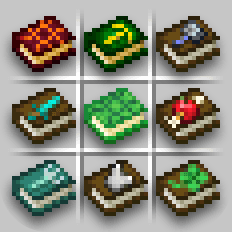
Enchanted Books: Re-covered
The new look of enchanted books' covers
About
Re-covered gives new textures to enchanted books, each with unique and intuitive look.
Drawn in vanilla art style, using symbols that represent enchantments' effects.
The era of organized chests has arrived, and the days of endless item searching are over!
Now you can simply judge the book... by its cover.
| Version | Support |
|---|---|
| 1.21.5+ | ✓ |
| 1.21.4 - 1.21.2 | ⓘ Variants-CIT required |
| 1.21.1 - 1.18 | ⓘ CIT Resewn or OptiFine required |

Re-covered can be configured in-game using the mod Respackopts.

Alternatively, you can use your file explorer to change which files
this resource pack should use.
(!) When using older Minecraft versions, find the folder where textures are stored, and act analogically.
-
Disable animated textures
Go to "/assets/carl/textures/item/" and replace the animated textures with the ones located in the "not_animated/" folder. -
Old animated textures
Old versions of the animated textures for Respiration and Depth Strider can be found in the
"/assets/carl/textures/item/alternative/" folder. Make sure to also replace the*.png.mcmetafiles. -
Make the background of the recipe book button transparent
Go to "/assets/minecraft/textures/gui/sprites/recipe_book/" and replace the textures with the ones located in the "transparent/" folder. -
Use an alternative texture for Quick Charge
Go to "/assets/carl/textures/item/" and replace 'quick_charge.png' with one of the textures located in the "alternative/" folder. -
Pixelated Pack Icon
In the root directory, replace the 'pack.png' file with 'pack_32x32.png'.
- You can contact me directly at: boxtthehorse@gmail.com
- For feedback, bugs, questions, criticism, or suggestions, visit the GitHub repository
- You may use the included .json code for personal and commercial use. The license applies to the rest of the project
The story began with me playing Minecraft and my growing annoyance with the never ending game of hide and seek with the item tooltips of the specific enchanted books I was looking for. Every time, opening a chest meant being forced to play the game of memorising cards, seeing if you still remember the positions of all the books in the chest, and failing meant yet another search for the silly tooltip. The solution was either to install mods or learn speed reading.
</details> <details> <summary>What Sparked My Initiative</summary>I installed the first resource pack, and the required mods. Now, all books looked different from one another. But ironically, a new problem emerged. You could barely tell what the new textures were even supposed to mean in the first place. Colors for the sake of colors, metal platings, arbitrary symbols, particle effects all around, different glows, engravings, not anti-aliased pixel art, and well, in cases where pixel art was understandable, it just looked bad. Often there was so much going on with the "art" that you almost couldn't tell there was still a book underneath. And so, it was the memorisation game all over again, but this time, it was the meaning of the arbitrary textures you had to memorise. So I downloaded an another pack, and then another, and another... and all of them were mediocre to say the least. I was fed up with all of them, and with the fact that a couple of them had had hundreds of thousands of downloads. I was mad that something this simple with designs seemingly so obvious to come up with & use for this kind of resource pack hadn't been done by anyone yet. So basically I just gave up on other people to deliver, and decided to create my own designs. The proper way.
</details> <details> <summary>General Design Philosophy</summary>Before I list out all of the specifics, I will establish the general concept. Every single texture I was conceptualising was questioned whether it would make sense if it existed in real life, and by that, I don't mean in our reality, but in something like the Minecraft Movie kind of reality. Where, (unlike in the game) illogical textures aren't simply blindly accepted, because "we're in a video game", and at the same time, they are allowed to use some fantasy logic; Where it simply doesn't make sense for the glyphs to stick out of the book cover, like some kind of a UI element, but it is fine for the book to be more than just a stack of paper with a leather cover, and to possess some magical properties (like the Soul Speed book, having souls emerge from it).
In my methodology, I stuck to my self-established rules, which dictated what was and wasn't graphically acceptable, which helped the project retain its high standard (I think). I also came up with criteria that took into consideration differently experienced users, which helped me judge if the texture was conveying the right message effectively or not.
</details> <details> <summary>Design Rules & Visual Guidelines</summary>-
Elements that wouldn't make sense if they had to become physical are not allowed.
- elements like floating numbers or roman numerals, or health bars
- designs that would make the book unreadable, impossible to open, or its contents to be destroyed (books on fire, books turning into dust, pierced through books).
-
All symbolism has to come from Minecraft.
No symbols like hand-cuffs, guns, dynamite sticks, bombs, alphabet, numbers, christian crosses, punching gloves, magnifying glass, irl animals, etc. No references to human culture, even if the symbolism is widely recognizable. All of the meaning conveyed through the art must stem from Minecraft mechanics and knowledge about it, and if you don't draw the connections and fail to understand it, that's on you and your lack of knowledge about the game, not your unfamiliarity with the pop culture or unrelated symbolism. -
A villager must be considered the original designer.
We can say that villagers are capable of creating basically every enchanted book in the game. This means they firstly possess knowledge about a specific magical spell. Then, they write down this knowledge, and become literal authors of these books, book covers included. This rule is sort of analogical to the previous one and derives from it, but it makes these book designs so much more embedded in Minecraft's world. -
The design has to be within the book cover.
Nothing can stick out. No overly long arrows or swords, no making anything too big just because it's impossible for you to draw it in small enough scale. Deal with it or come up with some other concept. This has some exceptions, for example with books being overgrown with something, because it still makes sense fantasy-wise, and it also doesn't stop the book from being opened. -
Symbols must be aligned with the books' angled 30° rotation.
The best example is the creeper face on the Blast Protection book. I could've made it aligned with the pixel grid, but after a couple of attempts, I managed to make it look good enough in the rotated version. -
Book color that's not brown must be justified.
I aimed for the books to not be brown only if it improved their recognizability and/ or made them easier to understand. I wanted to avoid color coding the enchantments, because it would once again introduce the user to the game of memorisation, as in which color corresponds to what. The proper use of this solution is seen in the trident-exclusive enchantments. For example, for the Frost Walker, I could've technically made a brown book with a snowflake, but turning it into ice does make things more clear. Bane of Arthropods matches the spider's color scheme. Breach, in addition to needing to be differentiated from Protection, remains consistent with Wind Burst, further hinting that it's used with the Mace. -
Animations are reserved only to necessary elements.
If an element is supposed to represent movement, it should move. (In many packs I had seen people draw some kind of swirl of wind effects around the books, but these weren't even moving.) At the same time I only reserved animations for necessary things, or if the effect was truly worth it and pleasant to look at, because, although fun, the constant animations might be distracting. Not every mineral has to shine, not every eye has to blink, not every oceanic thing needs water dripping down from it.
In my designs, I tried creating textures which required zero, or as little thinking as possible in order to be understood. I tried to convey as little ambiguity as possible, so that the player's first connection in mind — between the book texture and the inferred magical result — would be the correct one, confirming the item's actual function.
Before committing to an idea, I would check if it was meeting certain conditions, and I would verify whether a potential user could answer specific question
Versions
- Separated the project into 3 different versions: - Vanilla (1.21.5+) - Variants-CIT (1.21.2 - 1.21.4) - CIT Resewn (1.18 - 1.21.1) - tweaked transparent recipe book button texture - fixed one pixel in Efficiency - fixed another pixel in Unbreaking ### Respackopts - fixed `.../not_animated/respiration2.png.rpo` lacking `.animated` suffix in its condition - added tooltip for transparent recipe book button option - changed respackopts version from 14 to 13
## 3.0 - Separated the project into 3 different versions: - Vanilla (1.21.5+) - Variants-CIT (1.21.2 - 1.21.4) - CIT Resewn (1.18 - 1.21.1) - tweaked transparent recipe book button texture - fixed one pixel in Efficiency - fixed another pixel in Unbreaking ### Respackopts - fixed `.../not_animated/respiration2.png.rpo` lacking `.animated` suffix in its condition - added tooltip for transparent recipe book button option ## 3.0 (Variants-CIT exclusive) - changed pack description - new folder structure ### Respackopts - changed respackopts version from 14 to 12
## 3.0 - Separated the project into 3 different versions: - Vanilla (1.21.5+) - Variants-CIT (1.21.2 - 1.21.4) - CIT Resewn (1.18 - 1.21.1) - tweaked transparent recipe book button texture - fixed one pixel in Efficiency - fixed another pixel in Unbreaking ### Respackopts - fixed `.../not_animated/respiration2.png.rpo` lacking `.animated` suffix in its condition - added tooltip for transparent recipe book button option ## 3.0 (CIT Resewn exclusive) - changed pack description - fixed sweeping edge not displaying texture in some versions - removed option for transparent recipe book button texture, since this version of Minecraft doesn't support this feature (only 1.21.2+) ### Respackopts - changed respackopts version from 14 to 9 - added tooltip to pack icon option about supported versions
Download
Download v3.0Minecraft: 1.21.5, 1.21.6, 1.21.7, 1.21.8, 1.21.9, 1.21.10, 1.21.11
Loaders: minecraft