
Icons
Introduces icons throughout different aspects of the game
About
📋 About
Icons adds icons to menus, items, tooltips, GUI's... just everywhere you could imagine them fitting.
The pack makes use of Custom Unicode Characters and Minecraft language files to add said icons.
Icons is fully customizable using the Respackopts mod.
🧩 Split & Addon packs
Looking for only the Menu icons? Or only Enchantments? Remove the Food icons? Look no further!
<details> <summary>Solo packs</summary>Icons - Armor & Food <br>  | Armor and Food preview icons for the items |
Icons - Effects <br>  | Effect icons for Potions, Tipped Arrows and Suspicious Stews |
Icons - Enchantments <br>  | Enchantment icons for Enchantments |
Icons - Menus <br>  | Menu icons |
Icons - Numerals <br>  | Enchantment Levels and Potion Potency numeral badges up to lvl 100 |
Icons - Tooltips <br>  | Tooltip icons for several items like Fireworks and Banners |
Icons - Armor & Food Remover <br>  | Armor and Food preview icons remover |
Barebones Icons <br>  | Addon for Icons or Icons - Menus adapting the Barebones style for the menu icons. |
Simple Icons <br>  | Addon for Icons or Icons - Menus adapting a white, font-like style for the menu icons. |
Small Icons <br>  | Addon for Icons or Icons - Menus adapting a small, font-sized style for the menu icons. |
Small Simple Icons <br>  | Addon for Icons or Icons - Menus combining Simple Icons and Small Icons into a small, white, font-like style for the menu icons. |
<details> <summary>✅ Packs & Addons by other creators</summary>

 | Vexcenot | Removes Icons Text-Logo if immersion breaking |
 | Fyoncle | Additional icons for many mods, mostly featured in Elysium Days |
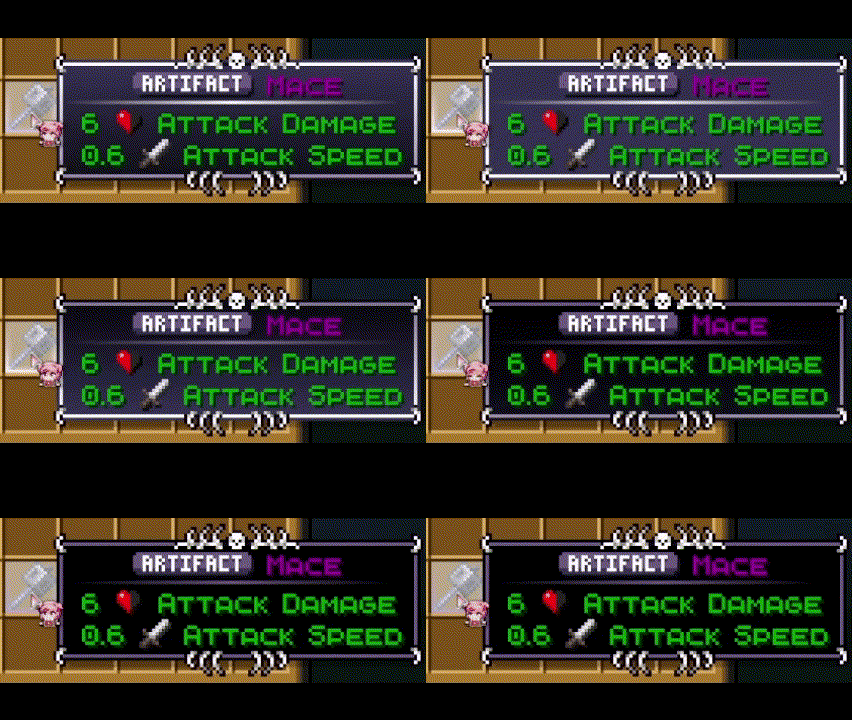 | freddyencoop | Custom rarities for all items - Compatible with Legendary Tooltips and Loot Beams |
 | semasem | Enchantment Levels and Potion Potency numeral badges - standalone based on ours |
<details> <summary>⚙️ Compatibility</summary> This pack is compatible with all resource packs, as long as it stays at the top of the resource packs selection
We cannot guarantee that Icons will work with packs that change the font of Minecraft nor mods that make use of strings that we work with since it was made with the default textures and vanilla in mind
</details> <details> <summary>❓ How to use</summary>- Drop the pack into your resource packs folder, or Drag and Drop it in the Resource pack selection.
- Select Icons.
(Have it on top of other packs if you use more) - Select the language in which you want to play
- “Force Unicode” must be turned to “off”!
- Enjoy!
<details> <summary>📄 Terms of Use & Attribution</summary>
You can:
-
✅ Use it in mod packs
-
✅ Use it for Content Creation like YouTube videos (Linking back to this or the other available pages (Modrinth, Planetminecraft, CurseForge))
You cannot:
-
❌ Redistribute edited or unedited assets
-
❌ Re-upload the pack
-
❌ Claim ownership over our assets
These terms may be changed as we deem necessary and at any time.
Versions of this pack before 1.9.2 make use of NegativeSpaces4 resource pack by AmberW/AmberWat which is under Creative Commons Attribution 4.0 International terms.
</details> <details> <summary>📝 Credits</summary>-
mr_ch0c0late (Creator and Idea
-
Zartrix (I'm just here, don't mind me)
-
Moggla (Creator of MC Language Formatter)
Versions pre 1.9.2:
- AmberW/AmberWat (Creator of NegativeSpaces4)
-
Leroidesafk (French, Romanian, Portuguese(BR), Italian)
-
Agente_511 (Portuguese(PT))
-
Blazemetal_VN (Vietnamese)
-
Victorth (Finding and fixing bugs in Portuguese(BR))

© 2026 WeNAN Studios. All Rights Reserved.
Versions
## 🛠️ Fixes, Changes and Adjustments: - Reverted the changes made to the pack.mcmeta file **This should resolve the issue of Respackopts not working as intended**
## ⚠️ Known Issues **Respackopts does not work in this Icons release** ## 🛠️ Fixes, Changes and Adjustments: Default.json changes: - Renamed `info.json` to `map.json` - Renamed `tooltips.json` to `info.json` Tooltip(items) folder structure changes: - Renamed `items` folder to `tooltip` - Renamed `banner` folder to `banner_pattern` - Renamed `tooltips` folder to `info` - Renamed `trim` folder to `smithing` **This should fix the mipmap issue in 1.20.1 that may occur with specific mods** - Removed "Formats" in pack.mcmeta due to it being deprecated in versions starting with 26.1
## ✨ Additions: - Added Icons for all 125 advancements  - Added Distance by Nautilus statistic icon - Added Lunge enchantment icon  - Added Nautilus Armor icons  - Added Breath of the Nautilus effect icon - Added Waypoint Transmit and Receive Range icon - Added Debug Controls icon ## 🛠️ Fixes, Changes and Adjustment: - Removed painting and disc artist icon - Added missing space in front of the world creation gamemode icons - Redesigned Curse of Binding icon - Tweaked Luck attribute icon - Enchantment level icons above 10 are now displayed in game - Added a fix for [Apothic Enchanting](https://www.curseforge.com/minecraft/mc-mods/apothic-enchanting) - Fixed resource pack frame - Tweaked creative inventory category icons - Reverted Fire Aspect icon ## ⚙️ Respackopts Exclusive: - Fixed Small Icons not loading - Removed Painting option
Download
Download v1.13.2Minecraft: 1.20, 1.20.1, 1.20.2, 1.20.3, 1.20.4, 1.20.5, 1.20.6, 1.21, 1.21.1, 1.21.2, 1.21.3, 1.21.4, 1.21.5, 1.21.6, 1.21.7, 1.21.8, 1.21.9, 1.21.10, 1.21.11
Loaders: minecraft